2 min read

Same records. Fewer clicks.

Same records. Fewer clicks.

We've made a round of updates across Relationships, Employees and Facilities. The information you manage is the same; it's now easier to read, quicker to edit and easier to trace back, right on the screens you already use.

  • 1 panel. Every relationship setting at the top of the agent's details.
  • 0 popups. Vendor ID and Notes edit right where you read them.
  • Full history. Employee changes since August, and every earlier note.

image1 (1)

Each agent relationship, managed from one panel

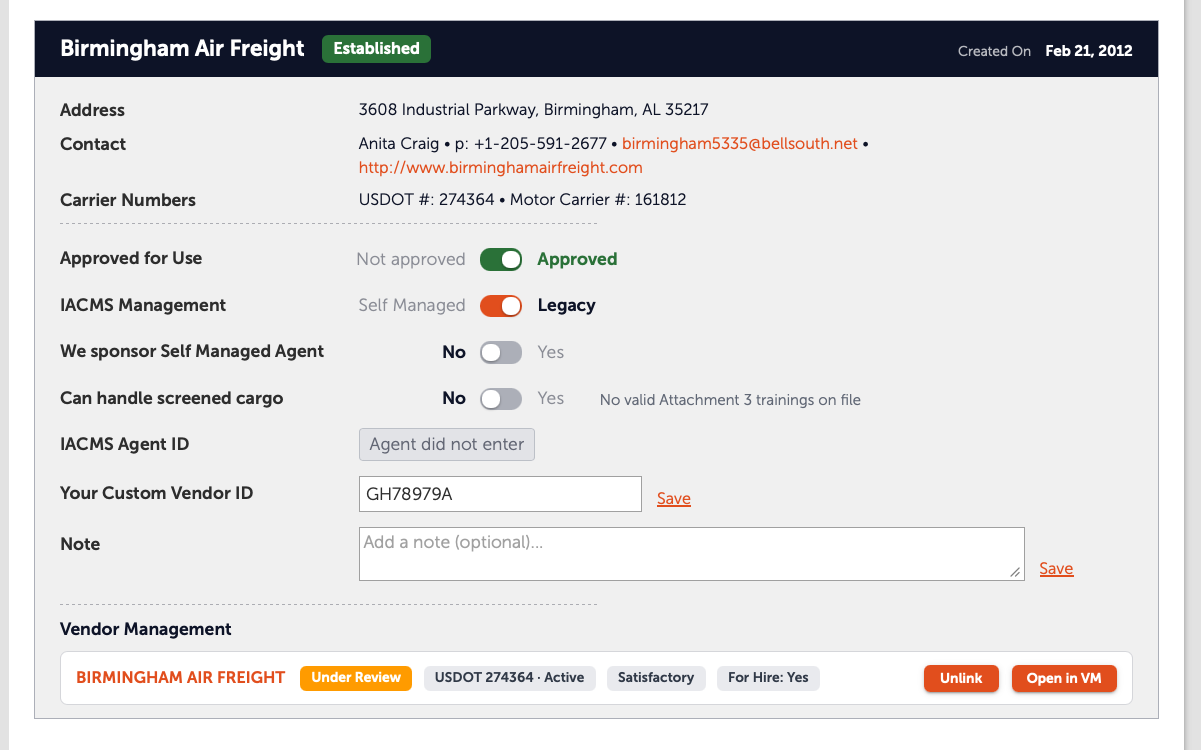
The settings you check most now sit together at the top of each agent's relationship details, so their status reads at a glance and changes take one tap.
  • Four settings, four switches. Approved for Use, IACMS Management, We sponsor Self Managed Agent and Can handle screened cargo each appear as a clear on/off switch.
  • Edit without a popup. Your Custom Vendor ID and Notes save right on the page, with no separate window to open and close.
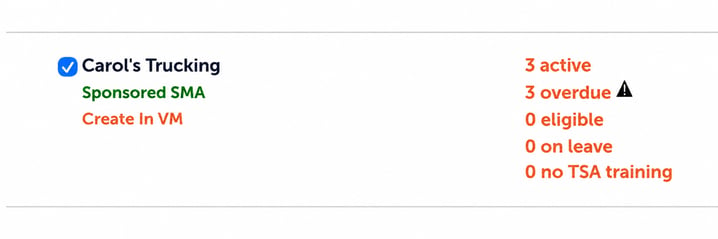
  • Sponsored agents stand out. Do you sponsor any of your Veroot agents' Self-Managed status? Turn on the sponsor switch on their relationship profile, and a green Sponsored SMA label marks them on the Relationships tab for quick review.

image2

The whole story of an employee's record

Behind the scenes, we began recording employee history over the summer. Now it's ready for you, alongside every note left on file through an employee's tenure.

  • Previous notes, one click away. Open Previous Notes to see every earlier note on file, with who wrote it and when, so nothing is lost. Collapse it again to keep the profile streamlined.

image3 (1)

  • View History. On the Employee Record of any of your agents' employees, the View History button at the top right lists the changes made since August, where applicable: when, who, and what changed from and to.

image4 (1)

Subscription status you can see at a glance

Each facility card now shows whether you're subscribed, and lets you change it, with one switch.

  • No more guessing. A Subscribed / Unsubscribed switch on every facility takes the guesswork out of its current status.
  • The same switch everywhere. It mirrors the switches in relationship details, so controls look and behave the same for everyone across your organization.

image5 (1)


Where to find each update

✓  Relationship switches, Vendor ID and Notes. At the top of any agent's relationship details.
✓  Sponsored SMA label. On the Relationships tab, once the sponsor switch is on.
✓  Previous Notes. Under Employee Notes on any employee profile.
✓  View History. Top right of any agent employee's Employee Record.
✓  Subscribe / Unsubscribe switch. On each facility card in Facilities.


Questions? Your Veroot contact is happy to walk you through any of these updates on a call. Get in touch.

Related posts you may be interested in reading:

Same training. Far less friction.

Same training. Far less friction.

Product announcements for September 15, 2026

Read More